Screen overview
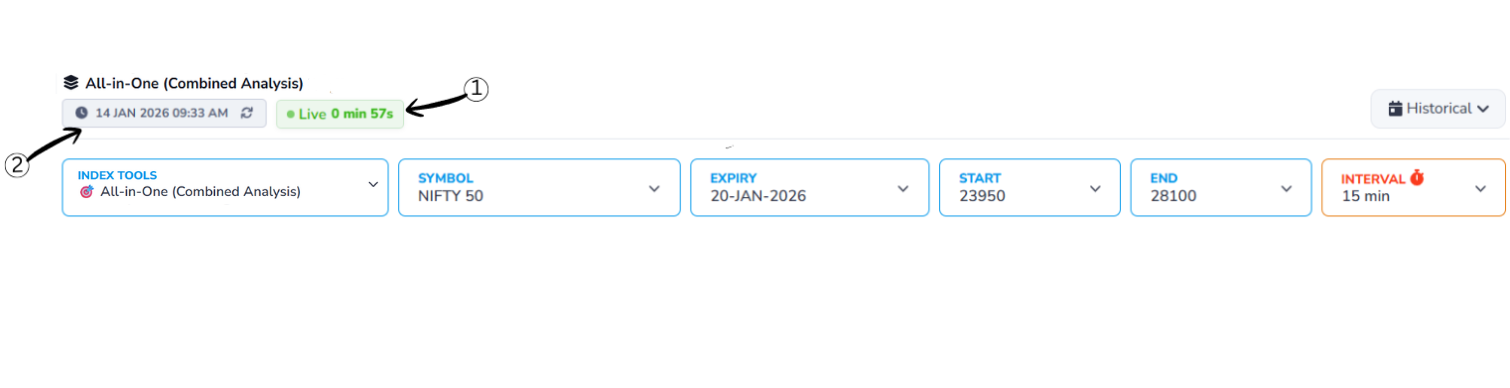
1Live Status Indicator
Shows that the displayed data is real-time market data and is being continuously refreshed. It also displays the time passed since the last data update, so you can see how fresh the information is.
2Last Updated Time
Shows the exact moment when the data was last refreshed. This timestamp helps you verify the recency of the information so you can base decisions on the most current market conditions.
Historical Data
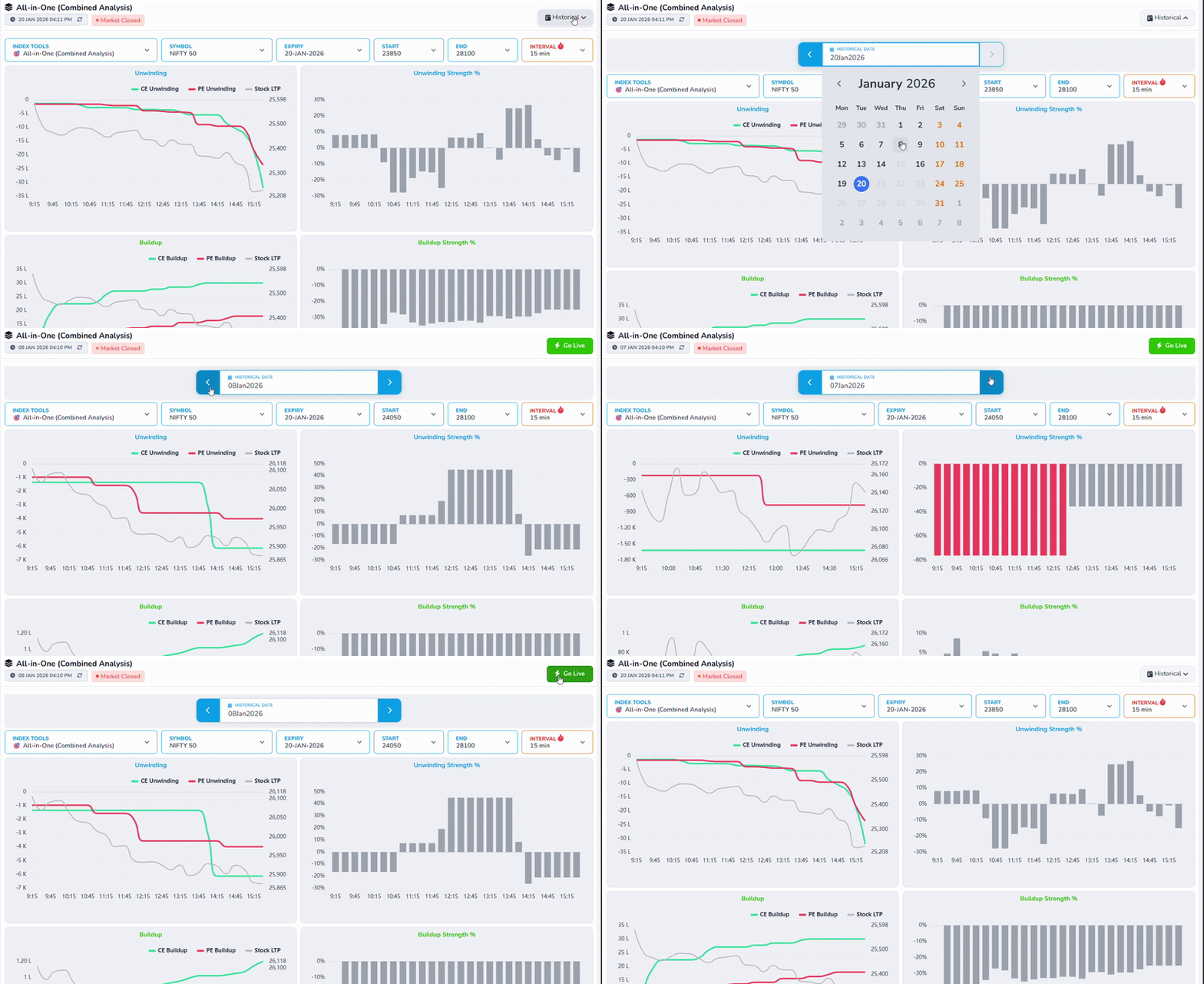
Choose a past date to view data for that trading day.
When you select a historical date, the charts and values update to show how All-in-One (Combined Analysis) behaved during that day instead of live market data.
This helps you analyze past market behavior, compare different days, and see how price movement and open interest changed over time.
Header Controls
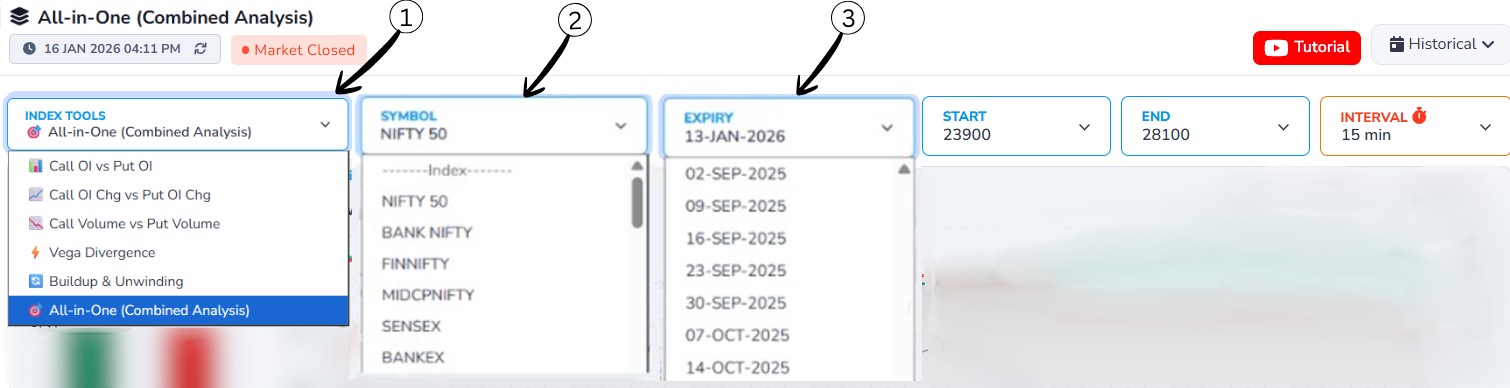
1Index Tools Dropdown
Allows users to select the type of analysis they want to view, such as All-in-One (Combined Analysis), Call OI vs Put OI, or Volume-based analysis. Once selected, the charts and data update accordingly.
2Symbol Selection Dropdown
Lets users choose the market index or symbol (e.g., NIFTY 50, BANK NIFTY, FINNIFTY). Selecting a different symbol updates the data to show All-in-One (Combined Analysis) specific to that index.
3Expiry Date Dropdown
Opens a list of available expiry dates. By selecting a different expiry date, users can view All-in-One (Combined Analysis) data for that specific expiry, making it useful for historical and comparative analysis.
Strike Price & Interval Controls
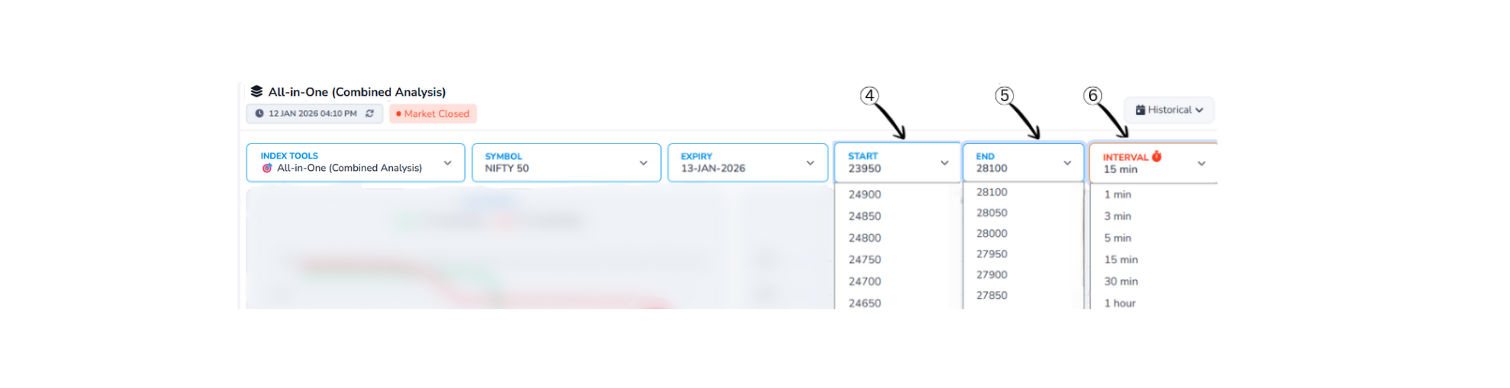
4Start Strike Price Dropdown
Allows users to select the starting strike price for the analysis range. The data and charts will begin calculating from this selected strike price.
5End Strike Price Dropdown
Used to select the ending strike price for the analysis. Together with the start strike, it defines the complete strike price range included in the analysis.
6Interval Selection Dropdown
Lets users choose the time interval (such as 1 min, 5 min, 15 min, or 30 min) for data calculation. A smaller interval shows more frequent changes, while a larger interval provides a smoother and broader market view.
Chart/Graph
1. Unwinding/Strength Graph
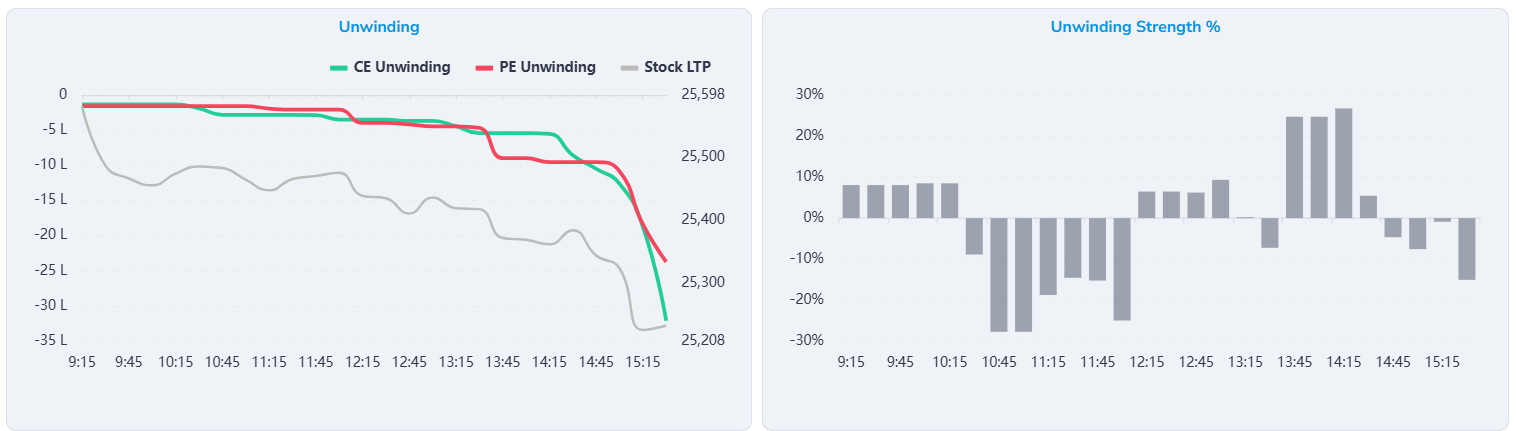
Unwinding (Line Chart)
- The X-axis shows the trading time from 9:15 to 15:15.
- Left Y-Axis (Options Unwinding)
- Shows Option Open Interest (OI) Unwinding value.
- Values are displayed in lots / lakh contracts.
- Zero line means no change in positions.
- Values below zero indicate positions are being closed (unwinding).
- More negative value = stronger unwinding pressure.
- The charts update as the trading session progresses.
- Right Y-Axis (Stock LTP)
- Shows the actual price (LTP) of the stock or index.
- Used only for the grey Stock LTP line.
- Price moves independently of the unwinding scale.
CE Unwinding (Green Line)
- Shows Call option positions being unwound during the day.
- Line moving downward means call writers are exiting positions.
- Sharp fall indicates strong call unwinding.
- Suggests reduction in bullish expectations.
PE Unwinding (Red Line)
- Shows Put option positions being unwound during the day.
- Line moving downward means put writers are exiting positions.
- Sharp fall indicates strong put unwinding.
- Often seen after a market move or near exhaustion.
Stock LTP (Grey Line)
- Represents the actual price movement of the stock or index.
- Falling LTP shows market weakness.
- Rising LTP shows market strength.
Unwinding Strength % (Bar Chart)
- Displays the strength of unwinding in percentage terms.
- Bars above zero indicate strong unwinding.
- Taller bars mean aggressive position exits.
- Bars below zero indicate resistance or opposite-side dominance.
How Both Charts Work Together
- Line chart shows which positions are unwinding and how much.
- Bar chart shows how strong that unwinding is.
- Unwinding with falling LTP confirms bearish pressure.
- Strong unwinding on both CE and PE suggests trend exhaustion.
2. Buildup / Strength Graph
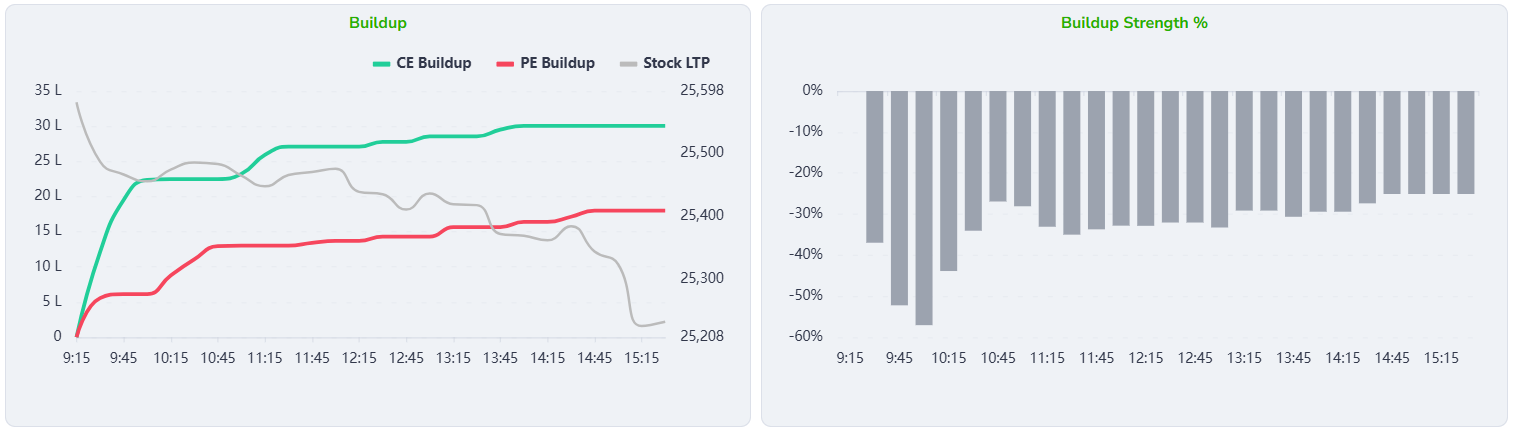
Buildup (Line Chart)
- The X-axis shows the trading time from 9:15 to 15:15.
- Left Y-Axis (Options Buildup)
- Shows Option Open Interest (OI) Buildup value.
- Values are displayed in lots / lakh contracts.
- Zero line means no new positions added.
- Values above zero indicate new positions are being created (buildup).
- Higher value = stronger position buildup.
- The charts update as the trading session progresses.
- Right Y-Axis (Stock LTP)
- Shows the actual price (LTP) of the stock or index.
- Used only for the grey Stock LTP line.
- Price moves independently of the buildup scale.
CE Buildup (Green Line)
- Shows Call option positions being added during the day.
- Line moving upward means new call positions are created.
- Steady rise indicates consistent call buildup.
- Represents increasing resistance or bullish writing.
PE Buildup (Red Line)
- Shows Put option positions being added during the day.
- Line moving upward means new put positions are created.
- Gradual rise indicates steady put buildup.
- Represents support creation or downside protection.
Stock LTP (Grey Line)
- Represents the actual price movement of the stock or index.
- Falling LTP shows market weakness.
- Rising LTP shows market strength.
Buildup Strength % (Bar Chart)
- Displays the strength of buildup in percentage terms.
- Bars below zero indicate strong buildup pressure.
- Deeper bars mean more aggressive position creation.
- Gradual reduction in depth shows weakening buildup.
How Both Charts Work Together
- Line chart shows which option side is building positions.
- Bar chart shows how strong that buildup is.
- CE buildup with falling LTP indicates call writing pressure.
- PE buildup with stable or falling LTP indicates support formation.
- Strong buildup with weak price movement suggests range-bound or capped market.
3. Call Oi vs Put Oi Graph
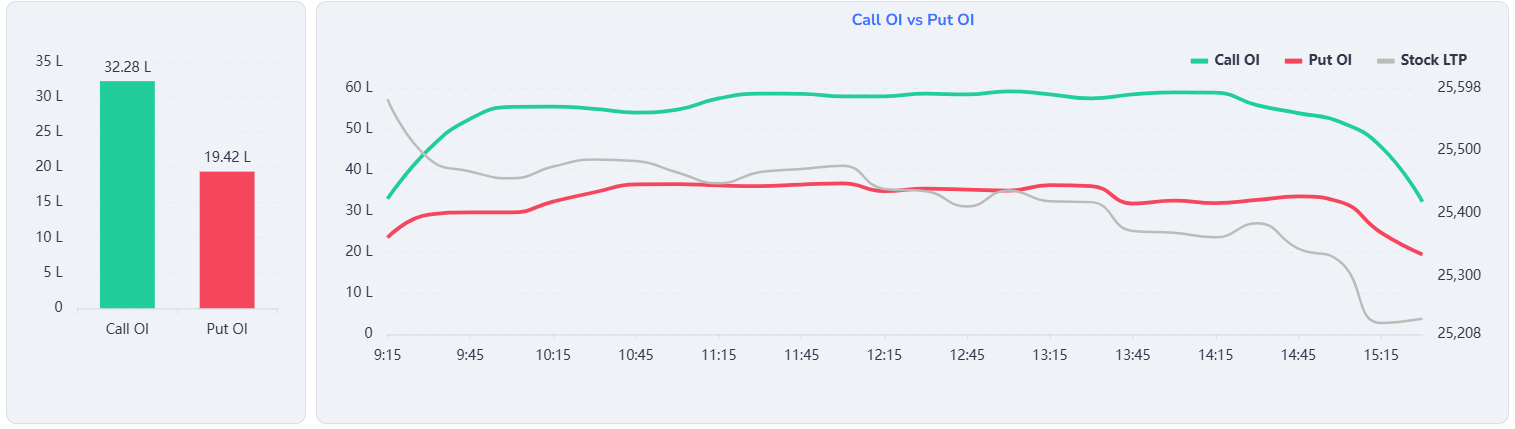
Chart Explanation
Green Line – CE OI Chg
- Represents the intraday change in Call Open Interest.
- When this line moves upward, it indicates new Call option positions are being added.
- Rising CE OI generally reflects call writing activity at higher levels.
Red Line – PE OI Chg
- Represents the intraday change in Put Open Interest.
- When this line rises, it means new Put option positions are being added.
- Put OI addition usually indicates support creation or downside protection.
Grey Line – Stock LTP
- Represents the NIFTY spot price movement during the trading session.
- Helps confirm whether option activity aligns with price action.
OI Change Summary (Left Bar Chart)
- CE OI Chg: ≈ 23.79 L
- PE OI Chg: ≈ 18.32 L
Conclusion
- Fresh Call OI addition is higher than Put OI addition.
- This indicates stronger call writing activity compared to put writing.
- Such positioning suggests intraday bullish bias by option writers in this price range.
4. Call Oi chg vs Put Oi chg Graph
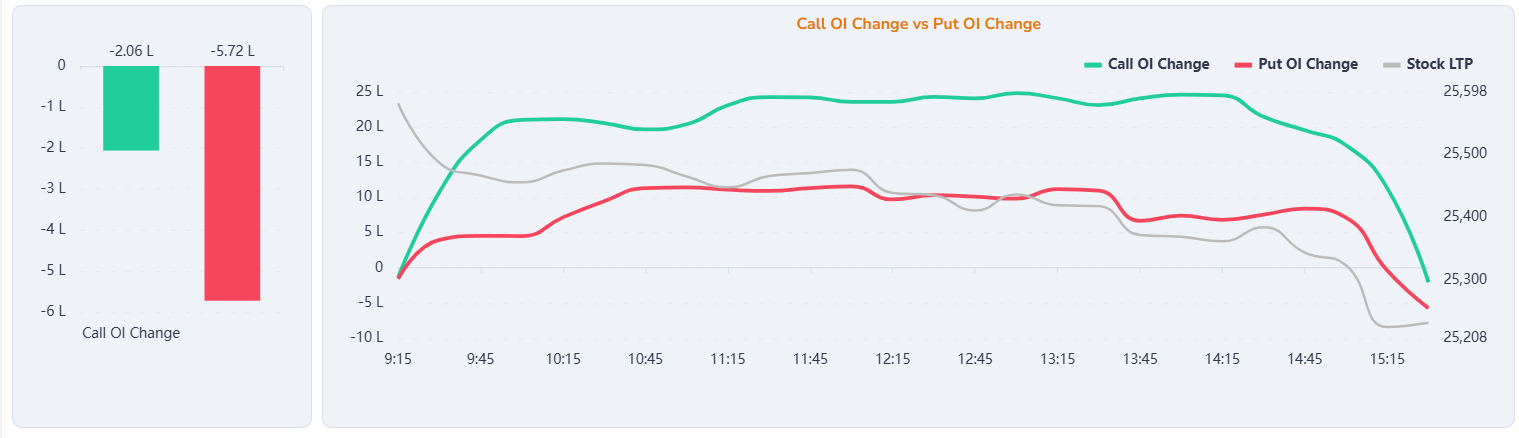
Chart Explanation
- Green Line – CE OI Chg: Intraday change in Call Open Interest. When this line rises, it means new call positions are being added during the day.
- Red Line – PE OI Chg: Intraday change in Put Open Interest. When this line rises, it means new put positions are being added during the day.
- Grey Line – Stock LTP: Represents the NIFTY spot price movement throughout the session.
OI Change Summary (Left Bar Chart)
- CE OI Chg: ≈ -2.06 L
- PE OI Chg: ≈ -5.72 L
Conclusion: Since fresh Call OI addition is higher than Put OI addition, it indicates intraday bullish positioning by option writers in this price range.
5. Call Volume vs Put Volume Graph
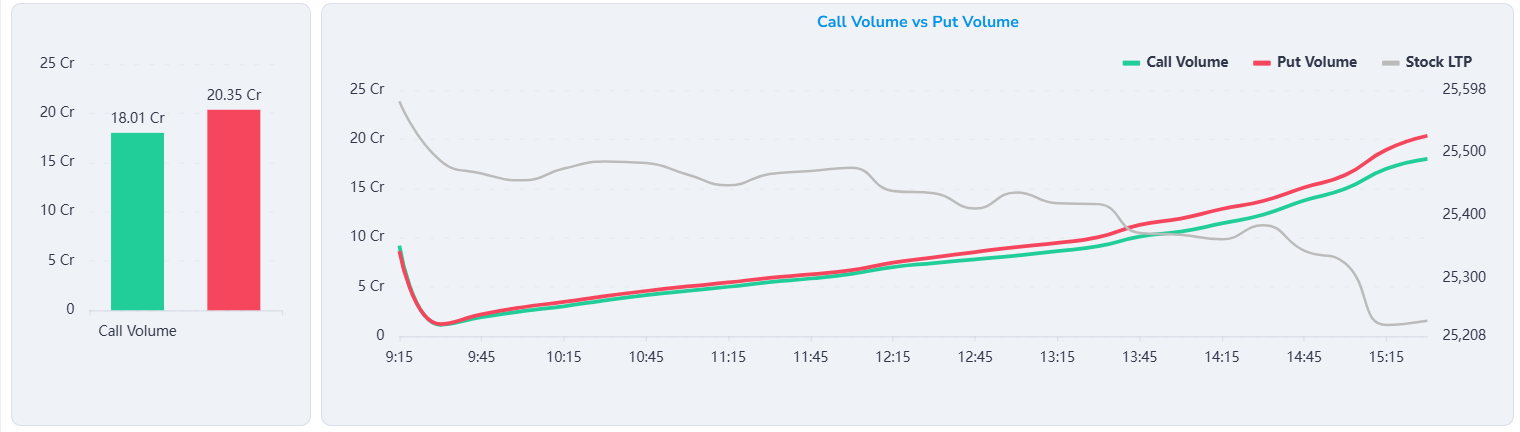
Chart Explanation
Green Line – Call Volume
- Represents the intraday Call option trading volume.
- Shows how actively Call options are being traded during the session.
- A steady rise indicates increasing participation on the Call side.
- Lower volume compared to Put side suggests less aggressive Call trading.
Red Line – Put Volume
- Represents the intraday Put option trading volume.
- The red line stays above the green line for most of the session.
- This indicates higher trading activity in Put options.
- Rising Put volume reflects strong demand for downside protection or bearish trades.
Grey Line – Stock LTP
- Represents the NIFTY spot price movement throughout the trading session.
- The price shows a gradual decline as the session progresses.
- Falling LTP along with higher Put volume confirms bearish market sentiment.
Volume Summary (Left Bar Chart)
- Call Volume: ≈ 18.01 Cr
- Put Volume: ≈ 20.35 Cr
Conclusion
- Put Volume is higher than Call Volume for the session.
- This indicates stronger participation on the Put side.
- Higher Put volume along with a falling index suggests intraday bearish bias.
- Traders are actively using Put options for hedging and bearish positioning.
6. Graph-Chart Setting
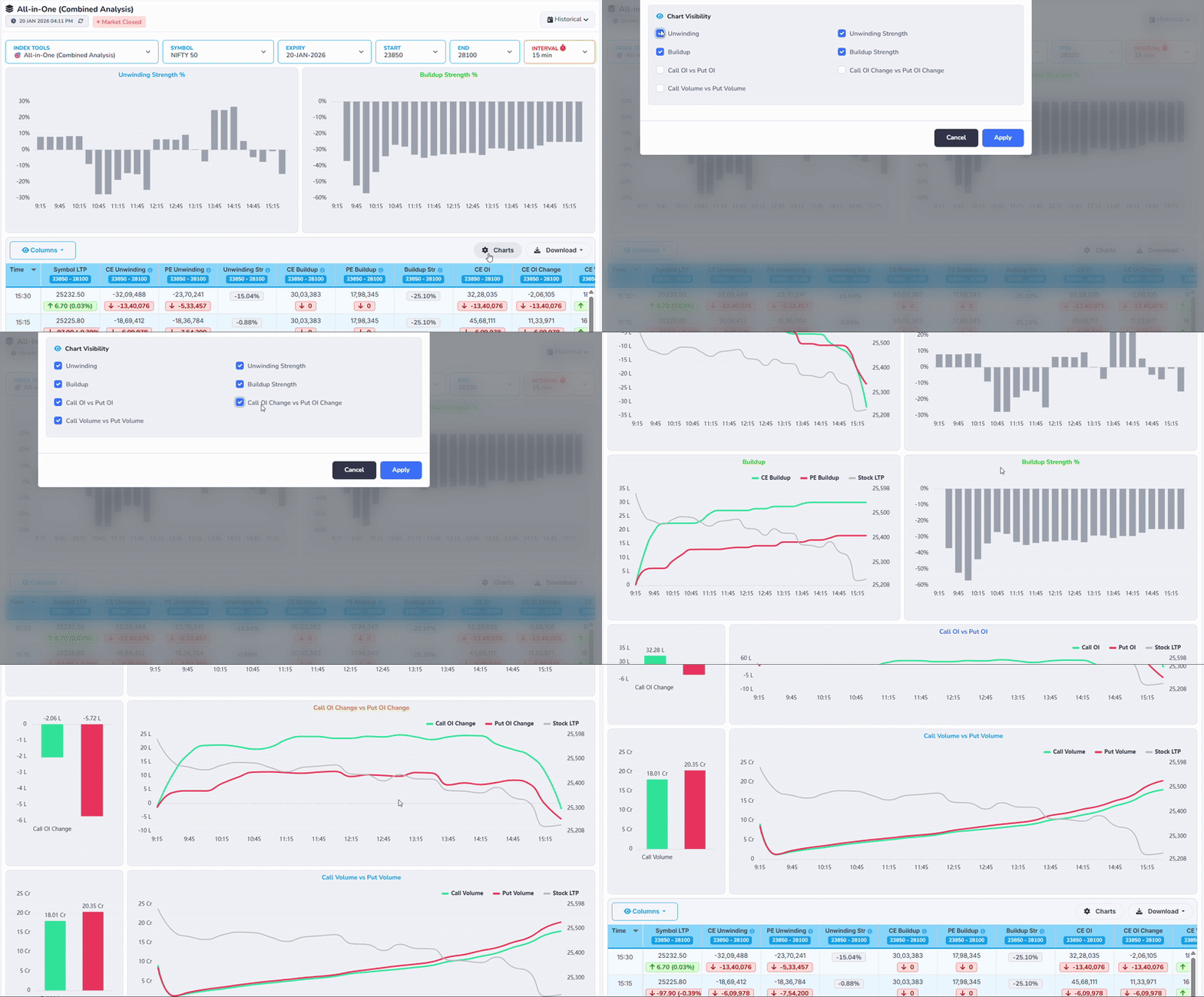
Chart Settings – How to Customize the View
The Chart Settings option helps you control what data is displayed on the chart and how it is visualized. By clicking the Charts (⚙️) icon, you can open the chart settings panel. This panel allows you to adjust the chart according to your analysis needs instead of viewing fixed or default data.
Column/Download

1Columns Selection
Allows users to enable or disable table columns based on their preference.
2Download Options
Lets users export the displayed data for offline use or record keeping.
Time & Price Data
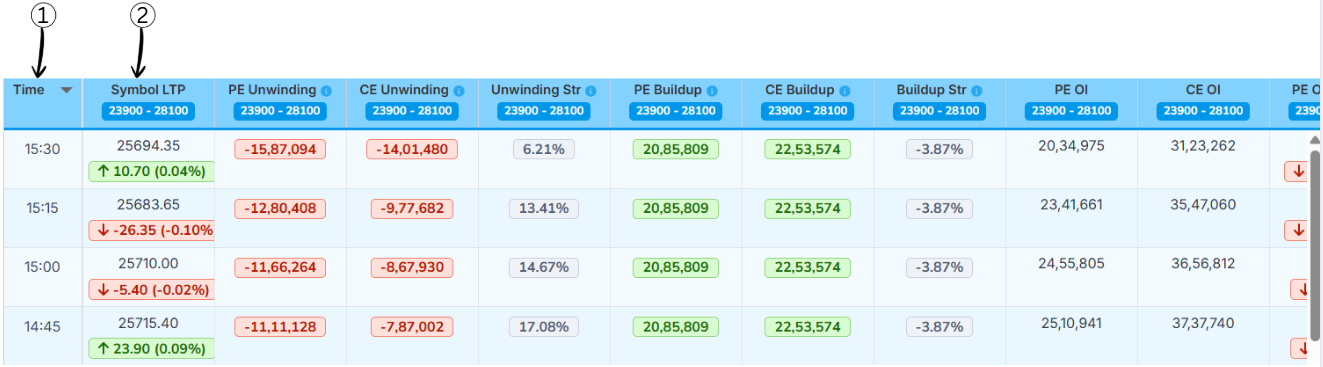
1Time
This column shows the exact time at which the market data was recorded.
In simple words, it tells when the All-in-One (Combined Analysis) values were captured during the trading day, helping users track changes over different time intervals.
2Symbol LTP (Last Traded Price)
LTP stands for Last Traded Price of the selected symbol (such as NIFTY 50).
It shows the latest price at which the symbol was traded at that time. A green arrow indicates a price increase, while a red arrow indicates a price decrease compared to the previous interval.
OI Data (Unwinding)
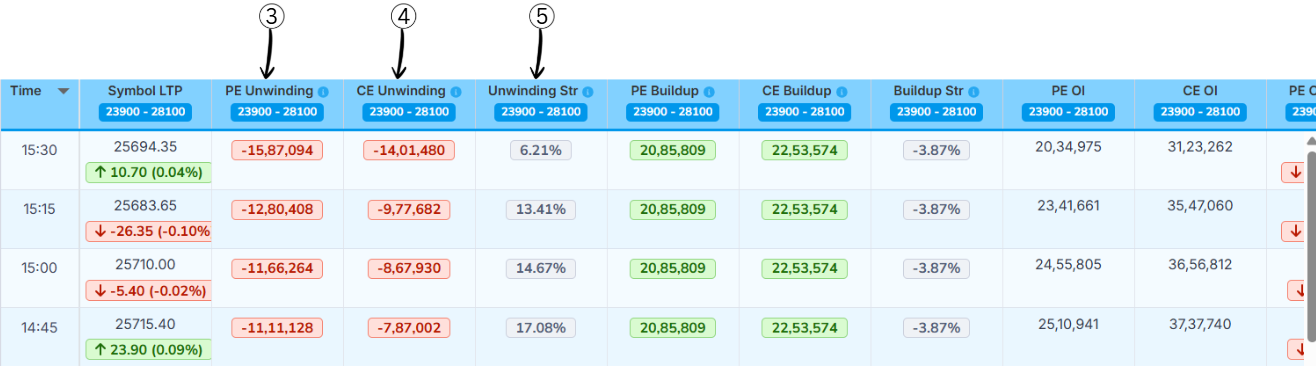
3PE Unwinding
This column shows how many Put Option (PE) positions are being closed or reduced. It tells us how much traders are exiting put positions.
How to understand the value:
- Values are shown in negative numbers because positions are being closed
- A larger negative value indicates more put positions are being exited
- Higher PE unwinding suggests traders are reducing bearish bets, indicating a shift in market sentiment
4CE Unwinding
This column shows how many Call Option (CE) positions are being closed or reduced. It tells us how much traders are exiting call positions.
How to understand the value:
- Values are shown in negative numbers because positions are being closed
- A larger negative value indicates more call positions are being exited
- Higher CE unwinding suggests traders are reducing bullish bets, indicating a shift in market sentiment
5Unwinding Strength (Unwinding Str)
Unwinding Strength shows the relative strength between Call unwinding and Put unwinding. It helps identify whether bullish or bearish positions are being exited more aggressively.
Formula
Unwinding Str % = (CE Unwinding − PE Unwinding) / (|CE Unwinding| + |PE Unwinding|) × 100
How to read the result
- ≥ +60% → Bullish (Call unwinding is stronger)
- -60% to +60% → Neutral (Both sides are balanced)
- ≤ -60% → Bearish (Put unwinding is stronger)
Example
- CE Unwinding = -15,00,000
- PE Unwinding = -5,00,000
Unwinding Str % = (-15,00,000 − (-5,00,000)) / (15,00,000 + 5,00,000) × 100
Unwinding Str % = (-10,00,000 / 20,00,000) × 100
Unwinding Str % = -50%
Result: Unwinding Str % = -50%, which indicates Neutral sentiment with slightly stronger put-side unwinding.
OI Change (Buildup)
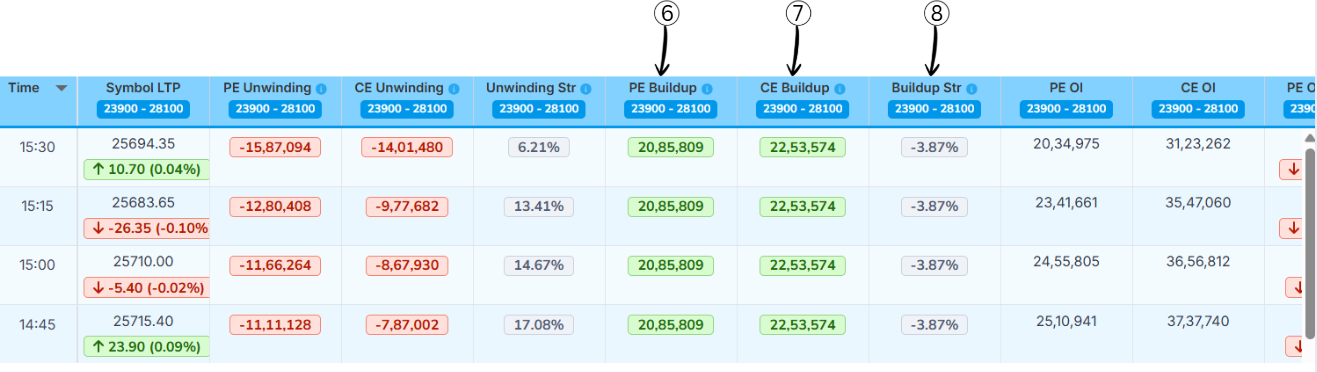
6PE Buildup
This column shows how many Put Option (PE) positions are being newly added. It tells us how much traders are creating new put positions.
How to understand the value:
- Values are shown in positive numbers
- A larger value indicates more put positions are being added
7CE Buildup
This column shows how many Call Option (CE) positions are being newly added. It tells us how much traders are creating new call positions.
How to understand the value:
- Values are shown in positive numbers
- A larger value indicates more call positions are being added
8Buildup Strength (Buildup Str)
Buildup Strength shows the relative strength between Put buildup and Call buildup. It helps identify whether the market is more bullish, bearish, or neutral.
Formula
Buildup Str % = (PE Buildup − CE Buildup) / (CE Buildup + PE Buildup) × 100
How to read the result
- ≥ +60% → Bullish (Put buildup is much stronger)
- -60% to +60% → Neutral (Both sides are balanced)
- ≤ -60% → Bearish (Call buildup is much stronger)
Example
- PE Buildup = 20,00,000
- CE Buildup = 10,00,000
Buildup Str % = (20,00,000 − 10,00,000) / (20,00,000 + 10,00,000) × 100
Buildup Str % = (10,00,000 / 30,00,000) × 100
Buildup Str % = 33.33%
Result: Buildup Str % = 33.33%, which indicates Neutral sentiment (not above +60% threshold).
Volume & OI Data
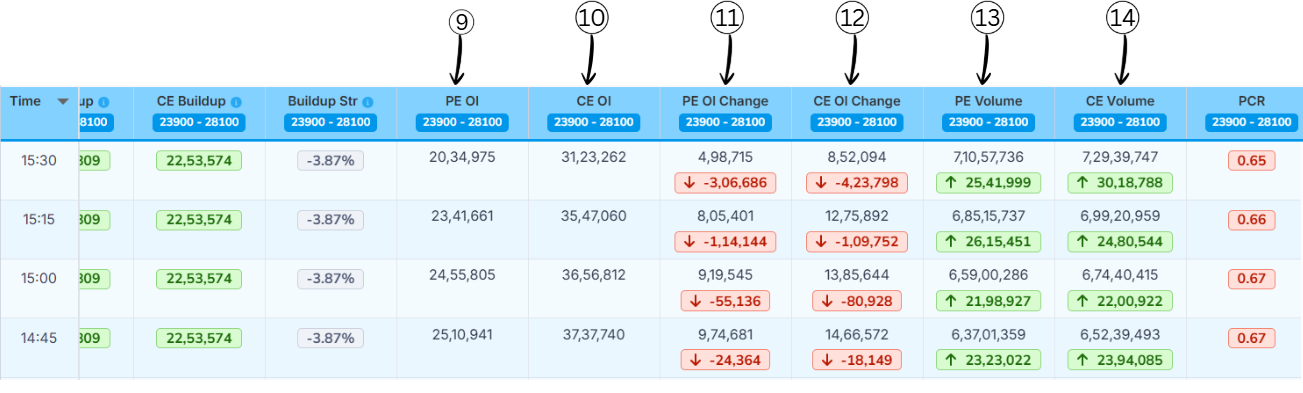
9PE OI (Put Open Interest)
This column shows the total number of active Put Option (PE) positions currently open in the market.
In simple words: It tells us how many put contracts are still open.
- Higher PE OI → Strong support area
- Shows heavy positioning on the put side
10CE OI (Call Open Interest)
This column shows the total number of active Call Option (CE) positions currently open in the market.
In simple words: It tells us how many call contracts are still open.
- Higher CE OI → Strong resistance area
- Shows heavy positioning on the call side
11PE OI Change
This column shows the change in Put Open Interest compared to the previous time interval.
In simple words: It tells whether put positions are being added or closed.
- Green value → New PE positions added
- Red value → PE positions closed
12CE OI Change
This column shows the change in Call Open Interest compared to the previous time interval.
In simple words: It tells whether call positions are being added or closed.
- Green value → New CE positions added
- Red value → CE positions closed
13PE Volume
This column shows the number of Put Option contracts traded during that time interval.
In simple words: It tells how actively put options are being traded.
- High volume → Strong interest on put side
- Confirms strength of PE buildup or unwinding
14CE Volume
This column shows the number of Call Option contracts traded during that time interval.
In simple words: It tells how actively call options are being traded.
- High volume → Strong interest on call side
- Confirms strength of CE buildup or unwinding
PCR & Max Pain Analysis
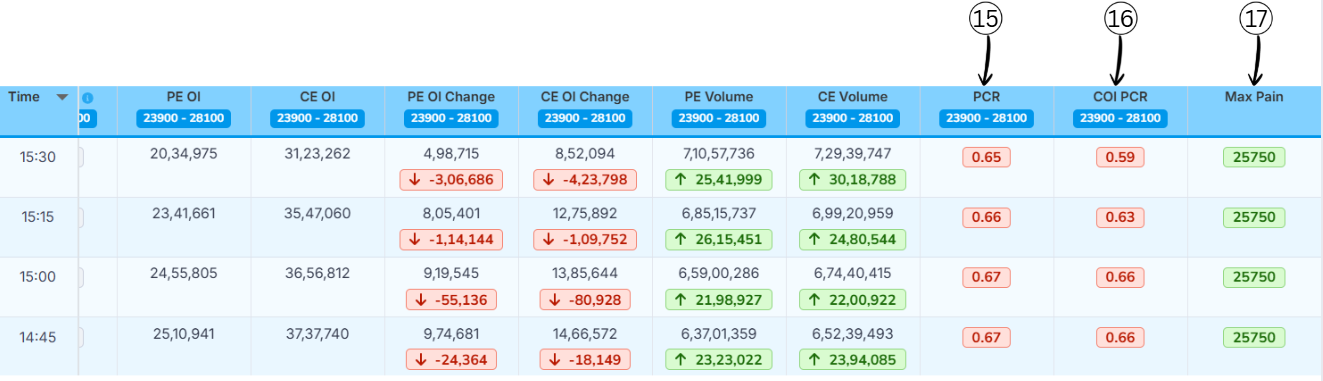
15Put Call Ratio (PCR)
Put–Call Ratio (PCR) is a market sentiment indicator that compares how many put options are being traded (or are open) to how many call options are being traded (or are open) for the same index or stock. It tells you whether traders, as a group, are more focused on protection/downside (puts) or on upside (calls).
PCR Formula
PCR = Total Put Open Interest ÷ Total Call Open Interest
Example:
- Total Put Open Interest = 24,00,000
- Total Call Open Interest = 20,00,000
Calculation: PCR = 24,00,000 ÷ 20,00,000 = 1.20
What PCR Values Mean?
| PCR Range | Market View |
|---|---|
| > 1.2 | Bullish |
| 0.8 – 1.2 | Neutral |
| < 0.8 | Bearish |
16COI PCR (Change in Open Interest Put–Call Ratio)
It shows which side added more fresh positions today — the put seller or the call seller.
COI PCR = Change in Put OI ÷ Change in Call OI
-
If COI PCR is above 1:
• More put OI was added than call OI.
• Put sellers are stronger → the market has a bullish bias. -
If COI PCR is below 1:
• More call OI was added than put OI.
• Call sellers are stronger → the market has a bearish bias.
Example 1
- Put OI added today: 30,000
- Call OI added today: 10,000
- COI PCR = 30,000 ÷ 10,000 = 3
- This means put sellers are much more active, so the market has a bullish bias
Example 2
- Put OI added today: 15,000
- Call OI added today: 30,000
- COI PCR = 15,000 ÷ 30,000 = 0.5
- This means call sellers are more active, so the market has a bearish bias
17Max Pain
Max pain (also called "maximum pain price") is the strike price where option buyers, in total, would lose the most money at expiry and option sellers would lose the least amount of money.
At this price, the maximum number of call and put options expire worthless or with very little value, so most buyers lose their premiums while sellers keep most of what they collected.
Many traders believe that, as expiry comes closer, the underlying price sometimes moves toward this max‑pain strike, because big option sellers try to hedge or manage their risk around that level. Max pain is not a guarantee or a magic target, just one way to see how positions are stacked in the option chain.